
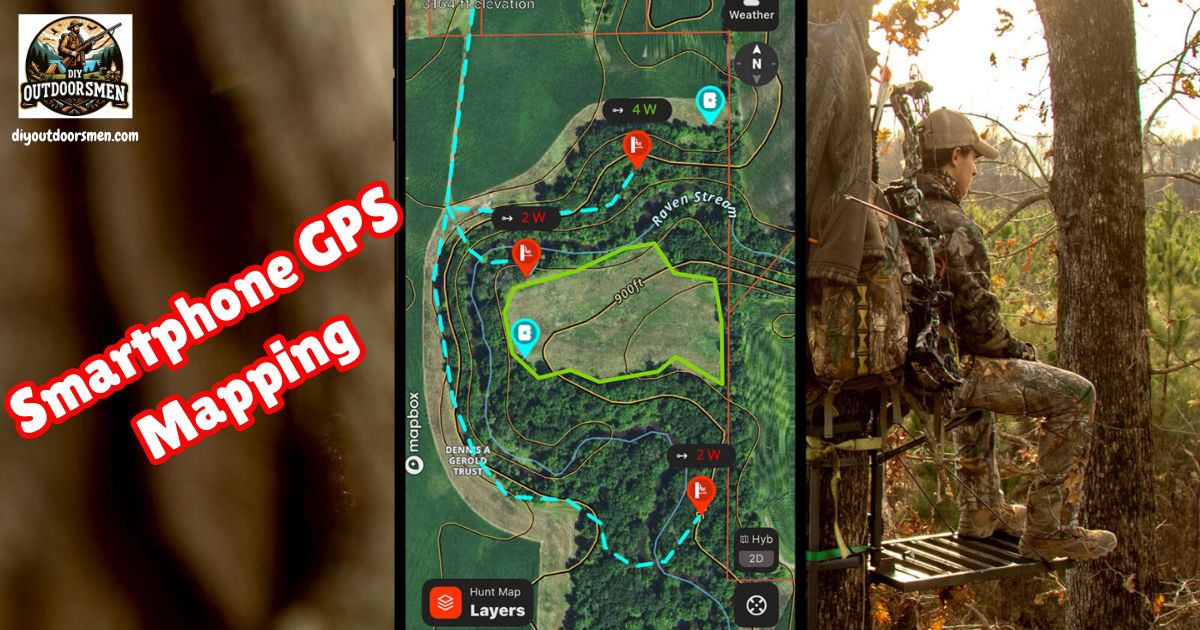
Smartphone GPS mapping has quickly become a really practical tool for outdoor enthusiasts, especially for hunting and hiking. My experience using these apps has shown me how much easier it is to plan routes, track movements, and stay aware of my location when I’m deep in the woods or miles from the nearest road.
Smartphones now rival dedicated GPS units, offering strong GPS accuracy, good mapping options, and plenty of features that make getting lost a lot less likely. Still, they come with a few important considerations, especially around battery life and weather resistance.
Understanding How Smartphone GPS Really Works for the Outdoors
Your phone’s GPS chips work independently from cell towers, which means that you won’t lose your ability to pinpoint your location when you lose signal. I’ve navigated remote canyons and backcountry forests with just my phone, as long as I remembered to download offline maps before heading out.
The accuracy in most environments is almost as good as what I’ve experienced on standalone GPS units. Deep canyons or thick forests can still cause slight delays in syncing your exact location, but the difference is rarely a deal breaker.
For hikers and hunters alike, one of the best parts about smartphone GPS is that you can put your phone in airplane mode to save battery and still maintain full GPS functionality. As long as you have your maps downloaded ahead of time, there’s no need to burn through data or worry about service blackouts. This peace of mind lets you focus on the adventure instead of constantly checking your signal.
Key Features to Look for in GPS Mapping Apps
Modern mapping apps for smartphones have brought a ton of sophisticated features to your pocket. Below are the features I use most and find really helpful:
- Offline Maps: Topographic maps, satellite images, and hybrid maps can all be downloaded ahead of time. If you’re venturing into the mountains, deep woods, or desert, having access to these without using mobile data is really important.
- Live GPS Tracking: Your current location shows up as a moving dot (or custom marker), and this position updates even if your device has no service.
- Route Planning and Waypoints: Drawing planned routes, dropping pins at key spots (like trailheads, camps, or blinds), and tracking your real-time path make navigation much easier.
- Land and Layer Info: Overlays for property boundaries, landowner information, game management units, and water sources are especially valuable for hunters.
- Sharing and Syncing: You can send routes to friends, family, or hunting partners, and keep your maps synced across devices through cloud services.
How Smartphone GPS Apps Are Used for Hunting
Using my phone while hunting, I rely on several core mapping functions. First, I scout new locations at home by examining the landscape in detail through satellite imagery. I look for edges, clearings, bedding areas, and potential game trails before I even set foot outside.
Marking interesting zones in advance lets me make the most of my time in the field. Additionally, knowing where public and private lands meet helps me avoid trespassing. Some apps include explicit boundary lines and even contact info for landowners, which I’ve found really useful for getting permission.
When I choose stand or blind locations, I mark and color-code them to match wind direction, and plan my routes to avoid spooking game. For backcountry hunts, offline maps plus the breadcrumb trail from GPS tracking really save the day if I need to retrace my steps at dusk or in fading light.
Using Smartphone GPS Apps for Safer and Easier Hiking
When I’m hiking, these features come into play most often. Trail navigation with GPX route files lets me follow mapped trails, monitor my distance traveled, and make sure I take the right turns at key junctions. Dropping waypoints at tough junctions, camps, or recognizable landmarks helps ensure I don’t get turned around and can always find my way back safely, even when weather conditions change unexpectedly.
Building custom routes lets me estimate elevation gain, check distances between camps, and track down water sources in advance. Since my phone handles navigation, camera, and note-taking, I can often leave a heavier GPS unit at home if I manage battery life wisely by bringing extra power banks.
Pros and Cons of Using Smartphone GPS for Hunting and Hiking
I’ve found that smartphone mapping solutions shine in some areas but require planning in others. Here’s what stands out from my use:
- Advantages:
- Super detailed satellite and topographic maps that stay updated more easily than stand-alone units.
- Full offline function as long as you prep your maps ahead of time.
- All-in-one: camera, notes, weather apps, and texting are all right there.
- Lower upfront cost compared to a dedicated GPS, especially since you already own the phone.
- Data and waypoints sync easily to the cloud, so you can access your info on various devices without hassle.
- Downsides:
- Battery life is the main challenge; continuous GPS and screen use drains the phone in hours, especially if the weather turns cold.
- Phone fragility. They don’t like hard drops, water, or very cold weather, so extra protection is needed.
- If you wear gloves or it’s raining, the touchscreen becomes almost impossible to use.
- Pretrip downloads are a must. You won’t always have a chance to download maps once in the field, so preparation is key.
- For really remote, multiday trips, dedicated GPS units are still the safer bet because they’re built to withstand a lot more abuse.
Best Smartphone GPS Apps for Outdoor Use
Through a lot of trial and error, these apps have proven to work especially well for my hunting and hiking trips:
- OnX Hunt: Best for serious hunters due to super detailed boundary overlays, landowner data, and public access maps.
- Gaia GPS: Really strong for backcountry travel, with advanced layering and offline map downloads that work for both hiking and hunting.
- HuntStand: Great if you want a combo of property info, stand mapping, and weather/wind integration on one interface.
- AllTrails: My go-to for day hikes and easy trip planning, since there are tons of crowdsourced trail maps and reviews to check out before heading out.
Everyone has their personal preferences, but trying out a few different apps is the best way to find which features suit your needs the most. Many offer free trials or basic versions so you can get a feel for their mapping style, layers, and route editing tools.
Frequently Asked Questions
Here are some common questions I get from friends and readers about using smartphone GPS for hunting and hiking:
Can I use my smartphone GPS with no cell signal?
Yes. The GPS chip in your phone works on its own. Just make sure you have all your maps downloaded to your phone ahead of time, so you don’t get stuck without coverage or navigation capabilities.
What should I do to conserve phone battery on long trips?
Keep your phone in airplane mode, dim your screen, close apps you’re not using, and bring backup power banks. Also, limit how often you use the GPS function and keep the phone warm if it’s cold outside, as cold weather reduces battery life more quickly.
Do smartphones really compare to standalone GPS units?
For short to moderate trips, definitely. Smartphone mapping is fast, easy to update, and offers a ton of detail. On long, really rugged trips, dedicated GPS units are a safer backup because of their extra battery life and durability in harsh conditions.
What backup should I bring with my smartphone?
Always pack a physical map and compass, plus at least one way to recharge your phone while outdoors. This redundancy helps you handle surprises, no matter how well your phone usually performs.
Wrapping up, smartphone GPS apps have unlocked next-level cool options for hunters and hikers who want detailed, flexible maps in their pockets. While planning and backups remain crucial, these devices are proving to be reliable companions for safe, smart travel outdoors.
Tips for Making the Most of Smartphone GPS Outdoors
Getting better results starts with a little preparation and know-how. Here’s what I’ve learned from experience:
- Battery Management. Always bring at least one backup power bank. Turn on airplane mode and lower your screen brightness whenever possible. Portable solar chargers are also handy for longer trips.
- Protect Your Phone. A weatherproof and shock-resistant case goes a long way to keep your phone safe. Dry bags help too when it’s really wet or snowy.
- Preload Maps and Layers. Download all necessary maps, layers, and GPX files before you leave home; cell service can’t be counted on once you’re out there.
- Practice BeforeHunt or Hike. Get comfortable with your chosen app before you rely on it out in the field. Figure out how to set waypoints, use trackback, and share your location with others.
- Extra Navigation Tools. I always bring a paper map and compass as a safety fallback, especially in new areas.
Important RealWorld Applications and Scenarios
Smartphone GPS mapping pays off most in these hunting and hiking situations:
- During Preseason Scouting. I use satellite layers to identify likely bedding areas, mark old sign, and check for habitat changes from year to year, giving me a reliable edge.
- Backtracking Safely. More than once, I’ve had to backtrack out of thick fog or after dusk, guided entirely by my phone’s GPS breadcrumb trail. This ability has kept me calm in situations that might otherwise turn stressful.
- Staying on Public Land. In checkerboard ownership regions, the property overlays have kept me on the right side of the line and away from accidental trespass, which can be a legal headache.
- Checking Water Sources. On multiday hikes, I plan my camps around mapped water sources found in topo and hydro layers within the app. This ensures I always know where to refill and don’t risk dehydration.
Additionally, smartphone GPS can be a lifesaver if you need to evacuate quickly or send your location to a friend when plans change midhike. It also serves to document your path so you can retrace your adventure later or share it with others online. As apps improve, expect features like real-time weather alerts and emergency SOS signals to become more common and reliable.
Most Recent Articles:
- Off-road Vehicle Recovery Techniques
- Electric Vs. Manual Game Calls and Which Works Better?
- Comparing All-Terrain UTV Winches For Remote Hunting Access
- How To Create Wildlife Bait From Kitchen Scraps

- Reliable Trail Camera Rigs For Hunters On A Tight Budget

- Suburban Bowhunting Tips

As always, stay safe, enjoy the journey, and please try to leave it cleaner than you found it. If you have any comments, questions, ideas, or suggestions, please leave them in the comment section below, and I’ll get back to you ASAP. You can follow us on YouTube: Man Art Creations for videos of our DIY Adventures.
P.S. Thanks so much for checking out our blog; we really appreciate it. Just so you know, we may receive a commission if you click on some of the links that appear on our site. This helps us keep our content free and up-to-date for everyone. We appreciate your support!